Learning Examples | Foundations | Hacking | Links
''Examples > Control Structures"
If Statement (Conditional Statement)
The if() statement is the most basic of all programming control structures. It allows you to make something happen or not depending on whether a given condition is true or not. It looks like this:
if (someCondition) {
// do stuff if the condition is true
}
There is a common variation called if-else that looks like this:
if (someCondition) {
// do stuff if the condition is true
} else {
// do stuff if the condition is false
}
There's also the else-if, where you can check a second condition if the first is false:
if (someCondition) {
// do stuff if the condition is true
} else if (anotherCondition) {
// do stuff only if the first condition is false
// and the second condition is true
}
You'll use if statements all the time. The example below turns on an LED on pin 13 (the built-in LED on many Arduino boards) if the value read on an analog input goes above a certain threshold.
Hardware Required
- Arduino Board
- (1) Potentiometer or variable resistor
- (1) 220 ohm resistor
- (1) LED
- hook-up wire
Circuit
click the image to enlarge
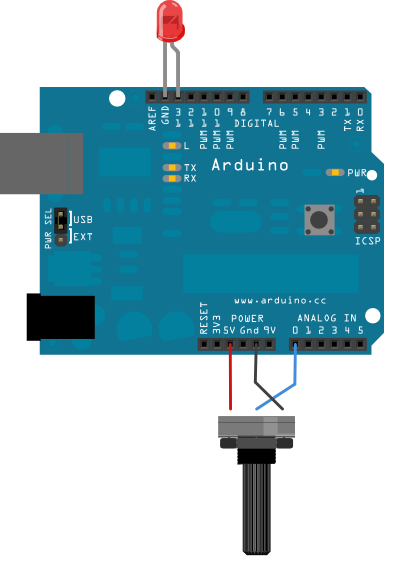
image developed using Fritzing. For more circuit examples, see the Fritzing project page
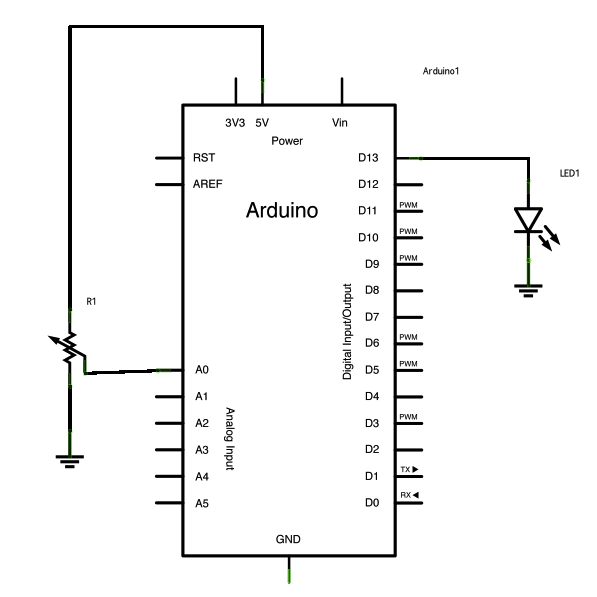
Schematic:
click the image to enlarge
Code
In the code below, a variable called analogValue is used to store the data collected from a potentiometer connected to the Arduino on analogPin 0. This data is then compared to a threshold value. If the analog value is found to be above the set threshold the LED connected to digital pin 13 is turned on. If analogValue is found to be < threshold, the LED remains off.
Conditionals - If statement
This example demonstrates the use of if() statements.
It reads the state of a potentiometer (an analog input) and turns on an LED
only if the LED goes above a certain threshold level. It prints the analog value
regardless of the level.
The circuit:
* potentiometer connected to analog pin 0.
Center pin of the potentiometer goes to the analog pin.
side pins of the potentiometer go to +5V and ground
* LED connected from digital pin 13 to ground
* Note: On most Arduino boards, there is already an LED on the board
connected to pin 13, so you don't need any extra components for this example.
created 17 Jan 2009
modified 9 Apr 2012
by Tom Igoe
This example code is in the public domain.
http://arduino.cc/en/Tutorial/IfStatement
*/
// These constants won't change:
const int analogPin = A0; // pin that the sensor is attached to
const int ledPin = 13; // pin that the LED is attached to
const int threshold = 400; // an arbitrary threshold level that's in the range of the analog input
void setup() {
// initialize the LED pin as an output:
pinMode(ledPin, OUTPUT);
// initialize serial communications:
Serial.begin(9600);
}
void loop() {
// read the value of the potentiometer:
int analogValue = analogRead(analogPin);
// if the analog value is high enough, turn on the LED:
if (analogValue > threshold) {
digitalWrite(ledPin, HIGH);
}
else {
digitalWrite(ledPin,LOW);
}
// print the analog value:
Serial.println(analogValue);
delay(1); // delay in between reads for stability
}
See Also:
- if()
- if...else
- analogRead()
- digitalWrite()
- serial.begin()
- serial.print()
- For Loop - Control multiple LEDs with a For Loop.
- While Loop - Use a While Loop to calibrate a sensor while a button is being pressed.
- Switch Case - Choose between a number of discrete values in a manner that is the equivalent of using multiples If statements. This example shows how to divide a sensor's range into a set of four bands and to take four different actions depending on which band the result is in.
- Array: a variation on the For Loop example that demonstrates how to use an array.
