Native Capacitive Sensors without additional Hardware
You can create a touch-sensitive input on any of the Arduino's pins. It requires no special hardware, nevertheless a capacitor of 1nF is recommended in line with the pin to decouple 50Hz noises.
Connect a wire or some metallic plate to a pin.
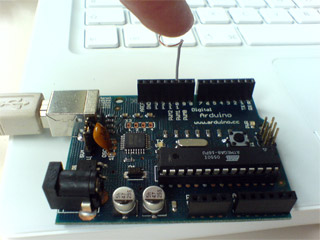
The code works by setting the pin to ground, turning on the internal pull-up resistor, and measuring the time it takes for the pin to return to the HIGH state. If untouched readCapacitivePin returns a low value e.g. "1"; when touched it rises to about 5. By adding some comparision with a threshold you can make it a boolean key input.
DO NOT CONNECT ANY ACTIVE DRIVER TO THE USED PIN !
the pin is toggled to output mode to discharge the port, and if connected to a voltage source, will short circuit the pin, potentially damaging the Arduino and any hardware attached to the pin.
Original code by Mario Becker, Fraunhofer IGD, 2007 http://www.igd.fhg.de/igd-a4
Updated by: Alan Chatham http://unojoy.tumblr.com
Updated by Paul Stoffregen: Replaced '328 specific code with portOutputRegister, etc for compatibility with Arduino Mega, Teensy, Sanguino and other boards
Gratuitous optimization to improve sensitivity by Casey Rodarmor.
With this function, you can call readCapacitivePin( pinNumber) and get a number from 0 to 17 corresponding to the level of capacitance on the pin - the number will be higher when you touch the pin.
// readCapacitivePin
//  Input: Arduino pin number
//  Output: A number, from 0 to 17 expressing
//  how much capacitance is on the pin
//  When you touch the pin, or whatever you have
//  attached to it, the number will get higher
#include "pins_arduino.h" // Arduino pre-1.0 needs this
uint8_t readCapacitivePin(int pinToMeasure) {
  // Variables used to translate from Arduino to AVR pin naming
  volatile uint8_t* port;
  volatile uint8_t* ddr;
  volatile uint8_t* pin;
  // Here we translate the input pin number from
  //  Arduino pin number to the AVR PORT, PIN, DDR,
  //  and which bit of those registers we care about.
  byte bitmask;
  port = portOutputRegister(digitalPinToPort(pinToMeasure));
  ddr = portModeRegister(digitalPinToPort(pinToMeasure));
  bitmask = digitalPinToBitMask(pinToMeasure);
  pin = portInputRegister(digitalPinToPort(pinToMeasure));
  // Discharge the pin first by setting it low and output
  *port &= ~(bitmask);
  *ddr  |= bitmask;
  delay(1);
  // Make the pin an input with the internal pull-up on
  *ddr &= ~(bitmask);
  *port |= bitmask;

  // Now see how long the pin to get pulled up. This manual unrolling of the loop
  // decreases the number of hardware cycles between each read of the pin,
  // thus increasing sensitivity.
  uint8_t cycles = 17;
       if (*pin & bitmask) { cycles =  0;}
  else if (*pin & bitmask) { cycles =  1;}
  else if (*pin & bitmask) { cycles =  2;}
  else if (*pin & bitmask) { cycles =  3;}
  else if (*pin & bitmask) { cycles =  4;}
  else if (*pin & bitmask) { cycles =  5;}
  else if (*pin & bitmask) { cycles =  6;}
  else if (*pin & bitmask) { cycles =  7;}
  else if (*pin & bitmask) { cycles =  8;}
  else if (*pin & bitmask) { cycles =  9;}
  else if (*pin & bitmask) { cycles = 10;}
  else if (*pin & bitmask) { cycles = 11;}
  else if (*pin & bitmask) { cycles = 12;}
  else if (*pin & bitmask) { cycles = 13;}
  else if (*pin & bitmask) { cycles = 14;}
  else if (*pin & bitmask) { cycles = 15;}
  else if (*pin & bitmask) { cycles = 16;}

  // Discharge the pin again by setting it low and output
  //  It's important to leave the pins low if you want to
  //  be able to touch more than 1 sensor at a time - if
  //  the sensor is left pulled high, when you touch
  //  two sensors, your body will transfer the charge between
  //  sensors.
  *port &= ~(bitmask);
  *ddr  |= bitmask;

  return cycles;
}