Feel free to use this page to experiment with the Text Formatting Rules. Just click the "Edit" link at the top of the page.
This wiki installation is running PmWiki pmwiki-2.1.beta30, version number 2000930.
- Uncle Bill's Solar Water Heater A solar water heater controlled by an Arduino
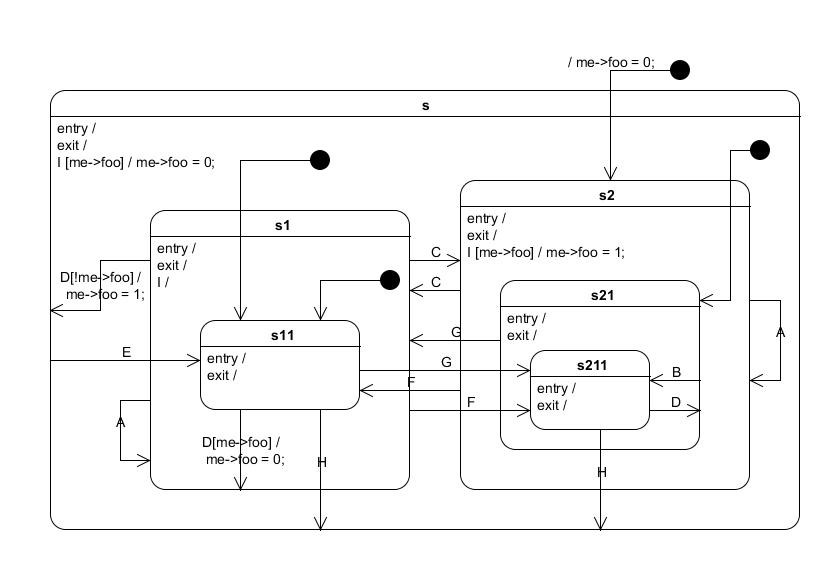
Example of a Hierarchical State Machine
Hardik http://hardikpandya.com/
http://www.arduino.cc/playground/Main/MultiIR
Arduino rules the world. Full Stop.
http://arduino.cc/playground/test1
http://arduino.cc/playground/test2
http://arduino.cc/playground/thruload
| Sparkfun | http://www.sparkfun.com |
| Adafruit | http://www.adafruit.com |
| Ebay | http://www.ebay.com |
| Arduino WheZ Style | |||
| BOOGLE | |||
| Arduino | Arduino is an open-source electronics prototyping platform based on flexible, easy-to-use hardware and software | www.arduino.cc | |
| B | |||
- Quarkstream - Arduino tutorial for high school class
| Boarduino | something descriptive... | http://www.ladyada.net/make/boarduino |
(:registerform:) test
| Product Description | Voltages | Analog Pins | Digital Pins | |||||||||||||||||||
| 3v3 | 5v | 0 | 1 | 2 | 3 | 4 | 5 | 0 | 1 | 2 | 3 | 4 | 5 | 6 | 7 | 8 | 9 | 10 | 11 | 12 | 13 | |
| LCD shield v1.1 with 5+1 Buttons | x | x | x | x | x | x | x | x | ||||||||||||||
| Ethernet ENC28J60 v1.1 | x | x | x | x | x | x | ||||||||||||||||
| Ethernet WIZNET 5100 | x | x | x | x | x | |||||||||||||||||
A link to a new page Imaguino Another link to a new page LM35HigherResolution
ip access-list extended example-acl
remark ** This is an example acl **
deny ip any host 10.0.0.1
permit ip any any
test with block background color and indented paragraph.
An example for code block with scrollbars:
- Note the outer Wikistyle does not work (as the div it generates closes immediately)
/* Blinking LED
 * ------------
 *
 * turns on and off a light emitting diode(LED) connected to a digital
 * pin, in intervals of 2 seconds. Ideally we use pin 13 on the Arduino
 * board because it has a resistor attached to it, needing only an LED

 *
 * Created 1 June 2005
 * copyleft 2005 DojoDave <http://www.0j0.org>
 * http://arduino.berlios.de
 *
 * based on an orginal by H. Barragan for the Wiring i/o board
 */

int ledPin = 13;                 // LED connected to digital pin 13

void setup()
{
  pinMode(ledPin, OUTPUT);      // sets the digital pin as output
}

void loop()
{
  digitalWrite(ledPin, HIGH);   // sets the LED on
  delay(1000);                  // waits for a second
  digitalWrite(ledPin, LOW);    // sets the LED off
  delay(1000);                  // waits for a second
}
Me: ltalionis
Who likes to me:
Who links to PinChange Int
Who has bad spelling?
These pages are defunct
SuggestionsBugs
Easy Installation Of The Arduino IDE
openSUSE - all versions
For all versions of openSUSE that are currently maintained (11.3, 11.4 and 12.1), click on the button bellow for One Click Installation via YaST.

- The installer will automatically choose packages of the same architecture (32 or 64 bit) as those used on your system.
- After installation, open YaST, select the "Security and Users" section and open the "User and Group Management" module. Once here, add each user to the groups: "dialout", "lock" and "uucp" in order for them to make use of the IDE.
- Log out and log in.
- Then run
arduinoin your favourite terminal.
Installation of Arduino IDE on openSUSE Linux (32bit and 64bit) Using The Command Line
Rest of page here...
Recommended Software For Use With Your Arduino Projects
Fritzing
Fritzing is an open-source initiative to support designers, artists, researchers and hobbyists to work creatively with interactive electronics. The Fritzing software can help you document your Arduino projects, learn more about electronic circuits, share your work with others and prepare your designs for professional manufacturing.
Easy Installation Of Fritzing
For all versions of openSUSE that are currently maintained (11.3, 11.4 and 12.1), click on the button bellow for One Click Installation via YaST.
- The installer will automatically choose packages of the same architecture (32 or 64 bit) as those used on your system.
- After installation, Fritzing can be launched from your desktop's menu. It is located in "Development" / "Integrated Environment".
?action=upload
Example 14|Int0 & Int1 example with debounce handling and true Rotary Encoder pulse tracking
J.Carter(of Earth)
- This tiny amount of code is focused on keeping the interrupts fast and totally responsible for encoder position
// 'threshold' is the De-bounce Adjustment factor for the Rotary Encoder.
//
// The threshold value I'm using limits it to 100 half pulses a second
//
// My encoder has 12 pulses per 360deg rotation and the specs say
// it is rated at a maximum of 100rpm.
//
// This threshold will permit my encoder to reach 250rpm so if it was connected
// to a motor instead of a manually operated knob I
// might possibly need to adjust it to 25000. However, this threshold
// value is working perfectly for my situation
//
volatile unsigned long threshold = 10000;


// 'rotaryHalfSteps' is the counter of half-steps. The actual
// number of steps will be equal to rotaryHalfSteps / 2
//
volatile long rotaryHalfSteps = 0;


// Working variables for the interrupt routines
//
volatile unsigned long int0time = 0;
volatile unsigned long int1time = 0;
volatile uint8_t int0signal = 0;
volatile uint8_t int1signal = 0;
volatile uint8_t int0history = 0;
volatile uint8_t int1history = 0;

void int0()
	{
	if ( micros() - int0time < threshold )
		return;
	int0history = int0signal;
	int0signal = bitRead(PIND,2);
	if ( int0history==int0signal )
		return;
	int0time = micros();
	if ( int0signal == int1signal )
		rotaryHalfSteps++;
	else
		rotaryHalfSteps--;
	}

void int1()
	{
	if ( micros() - int1time < threshold )
		return;
	int1history = int1signal;
	int1signal = bitRead(PIND,3);
	if ( int1history==int1signal )
		return;
	int1time = micros();
	}


void setup()
	{
	digitalWrite(2, HIGH);
	digitalWrite(3, HIGH);

	attachInterrupt(0, int0, CHANGE);
	attachInterrupt(1, int1, CHANGE);
	}

void loop()
	{
	long actualRotaryTicks = (rotaryHalfSteps / 2);
	}
Uncle Bill's Solar Water Heater
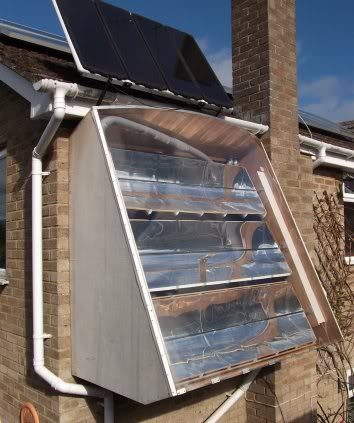
This solar water heater is controlled by an Arduino, and uses parabolic trough reflectors to focus sunlight onto a black painted water pipe. The Arduino takes inputs from 7 temperature sensors, 2 light sensors and a gravity sensor. It controls the elevation angle of the reflectors, the water pump, and a cooling fan. There is an LCD to provide system information, and a data logging facility.
Full details at: http://www.users.waitrose.com/~robinjames/SolarWaterHeater/SolarWaterHeaterHome.html
Testing a new page: Buffered Ethernet Server