For a simple and correct explanation on how to use 24LC256 and Arduino, please visit [here].
Do not use library
TWIPROM
24LC256 EEPROM, available at SparkFun.
What's the matter?
// Author is confusing pins A0~2. These are used to set the I2C bus device address for the 24LC256. This EEPROM has 32 kilobytes (256 x 8 bits) of storage space, nor any "blocks". See the data sheet...
Errors begin:
Here is how the 24LC256 works: you configure 3 pins on the chip to select what I call a "block", therefore, there are 8 blocks available. Each block is 32kb wide, and you can access the bytes in a block with a 14 bits address (which will be transmitted via I2C bus).
The only thing you've got to deal with is the block you want to use, and the operations (read/write).
The guts:
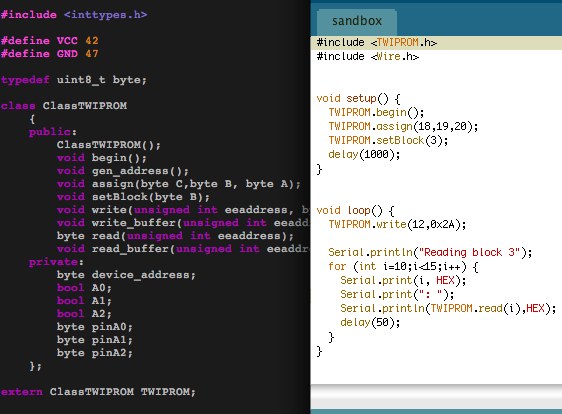
How to use it:
First of all, you need to enable I2C communications with TWIPROM.begin(). Then a little configuration of your stuff is necessary:
- The TWIPROM.assign method links 3 pins of the Arduino to the A0,A1,A2 pins of the EEPROM, so you can select the block you want to use.
- TWIPROM.assign(8,9,10) assigns pin 8 to A2, pin 9 to A1, pin 10 to A0.
- TWIPROM.assign(GND,GND,GND) won't assign any pin, only the block 0 will be available (connect A0,A1,A2 to ground).
- TWIPROM.assign(GND,VCC,GND) will make a hard-connexion to block 2.
- TWIPROM.assign(GND,8,9) will enable blocks 0 to 3, only pins 8 and 9 will be used.
- If you want to get access to the blocks, the best way is not to use the method above, but to use the TWIPROM.setBlock method. Be sure to have assigned a configuration that allows the block to be selected (eg: if you assign (GND,GND,GND), bloc 1 to 7 won't be accessible).
- setBlock(3) changes the value of pins assigned to have A0 = 1, A1 = 1 & A2 = 0, and updates the device address.
Wait.. Why do I bother with blocks?
Blocks are cool, as they are independant. When you use a block, all the others are read/write protected. Therefore, you can assign a block to a special storage task, or make a RAID system by writing the same data to 2 blocks..
If 32kb is enough for your design (or if you're running out of free pins), hard-connect A0,A1 & A2 to ground and use only block 0.
Read/Write methods
- To read a byte in the memory, use TWIPROM.read(address). It will return the byte located a the address specified, in the active block.
- To write a byte, use TWIPROM.write. The first parameter is the address, the second is the byte to write.
About addresses:
Use an unsigned int for the address. It is 15 bits long, so the maximum addressable byte is 32767.
About time:
A write cycle is 5ms long. Which means that writing the whole block using the single byte method is 2.7 seconds long. Be carefull with time-sensitive designs!