Arduino's LiquidCrystal Library with SPI
Author:  Juan Hernandez
Navigation
- Description
- Download, install and import
- Creation
- BreadBoard Ilustration
- Connections
- Information about this page
Description
This is the same library that comes with Arduino I just added SPI functionality to use a Shift Register (I was using a 74HC595). it can be used with SPI or the same way it was intended with six or eight wires or whatever. all I did was to add a way for it to communicate with the LCD using SPI and a shift register other then that it is the exact same. I figured why write another library when there was one already written and free and fully functional and made public for the same purpose. will Linux had become what it is if people would have writen a diferent operating system for every project they had, or functionality they needed I think not. (that is a message for everyone) so here it is I hope it is of use. I also hope no one else has written it already and I just wasted my time, since I am new and learning it takes me longer than it would a seasoned programer, also as I mentioned above I don't like to reinvent the wheel unless the code is not readily available. it was good learning though.
Download, install and import
This version only works in arduino versions before 1.0
Download here: LiquidCrystal.zip
this version works on arduino 1.0 and the older versions
Download here: LiquidCrystal_1.zip
Breadboard Sketch: LCD_using_74HC595_and_SPI.png
and replace the LiquidCrystal folder in the libraries folder of your Arduino installation directory with this one.
You can see an example sketch from "File -> Examples -> LiquidCrystal -> HelloWorld_SPI".
To create a new sketch, select from the menubar "Sketch->Import Library->LiquidCrystal". Once the library is imported, an '#include <LiquidCrystal.h>' line will appear at the top of your Sketch. you will also need to include the SPI library. (in other words just as you would use the regular Library since its the same) the only diference is it takes only one parameter the sspin for SPI (or the latchPin of the register) if you want to use SPI otherwise it is used the same.
Creation
I'll just use the example that is in the Examples folder:
- #include <SPI.h>
- //some comments missing here but they will be in the original sketch
- // include the library code:
- #include <LiquidCrystal.h>
- // initialize the library with the number of the sspin
- //(or the latch pin of the 74HC595)
- LiquidCrystal lcd(10);
- void setup() {
- // set up the LCD's number of columns and rows:
- lcd.begin(20, 4);
- // Print a message to the LCD.
- lcd.print("hello, world!");
- }
- void loop() {
- // set the cursor to column 0, line 1
- // (note: line 1 is the second row, since counting begins with 0):
- lcd.setCursor(0, 1);
- // print the number of seconds since reset:
- lcd.print(millis()/1000);
- }
Connections
The 74HC595 or the CD4094 shift register can be used. They operate in the same way, but they have different layouts and different names for the pins.
A clock signal is used for a serial input of 8 data-bits into a shift-register. The contents of the shift-register are copied into a latch with a strobe pulse. The outputs of the latch register is on the output pins.
Data = The data bits (74HC595 pin 14 "DS").
Clock = The shift clock for the data bits (74HC595 pin 11 "SHCP").
Latch = The strobe that copies the databits into the latch (74HC595 pin 12 "STCP").
Connect to SPI:
Data = MOSI = Arduino pin 11
Clock = SCK = Arduino pin 13
Latch = SS = Arduino pin 10, but also other pins can be used.
BreadBoard Ilustration
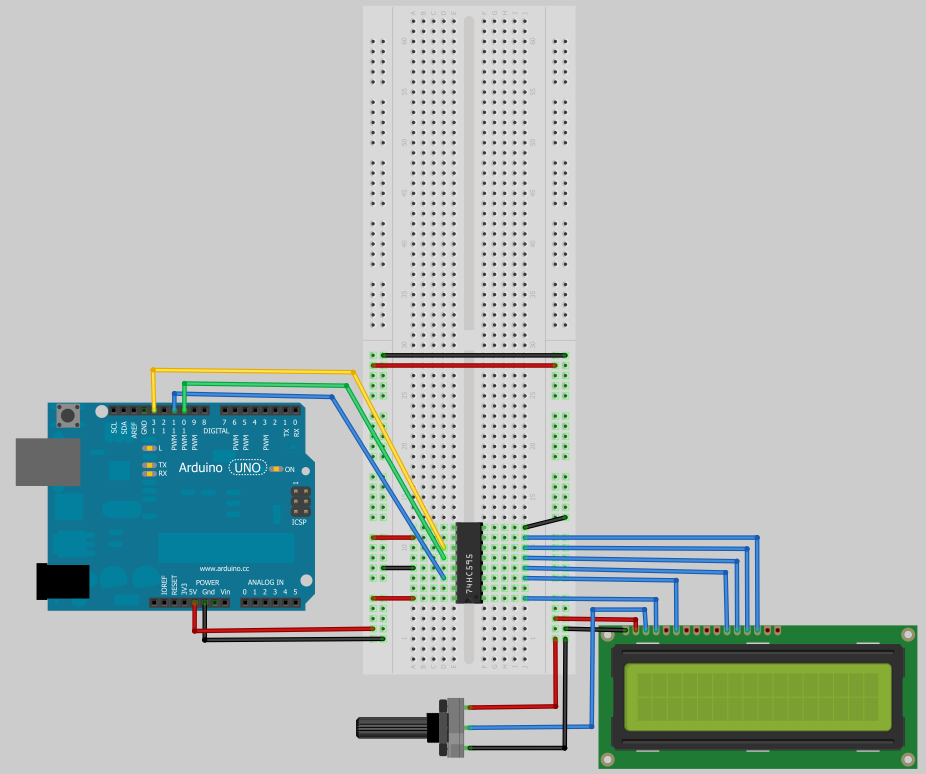
Note:I had to connect pin 5 on the LCD to gnd (not on diagram) to make it work.
Information about this page
| Last Modified: | August 04, 2012, at 03:52 PM |
| By: | binaryjam |