General
The PS2Keyboard library uses one of the two available external interrupts to react on keyboard input. Once such input is received, it's stored in a one-byte buffer and is available to be read.
Latest Version
Version 2.3 - Minor bugs fixed.
Connection
The following schematic shows how to connect a PS/2 connector:
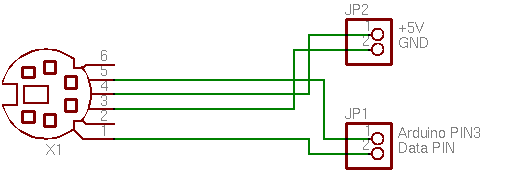
Make sure you connect the Clock PIN to the digital PIN 3 on the Arduino. Otherwise the interrupt, and therefore the whole library, won't work.
Usage
Below is a simple example on how to use the library. For more keycode constants have a look at the PS2Keyboard.h file.
#include <PS2Keyboard.h>

#define DATA_PIN 4
PS2Keyboard keyboard;

void setup() {
  keyboard.begin(DATA_PIN);

  Serial.begin(9600);
  Serial.println("hi");
  delay(1000);
}

void loop() {
  if(keyboard.available()) {
    byte dat = keyboard.read();
    byte val = dat - '0';

    if(val >= 0 && val <= 9) {
      Serial.print(val, DEC);
    } else if(dat == PS2_KC_ENTER) {
      Serial.println();
    } else if(dat == PS2_KC_ESC) {
      Serial.println("[ESC]");
    }
  }
}
Download
This library is at a very early stage. If anyone wants to revise/rewrite it, feel free to do so (published under the LGPL). Attach:PS2Keyboard002.zip
Leonardo Support
Slightly modified the PJRC 2.3 library to work with the Leonardo, the code is currently hosted here: https://github.com/yosemitebandit/PS2Keyboard.
FULL KEYBOARD IMPLEMENTATION CONTAINED IN PS2Keyboard_014A
NOTE: PS2Keyboard_014A is the library to use beginning with Arduino 0013. ** It contains a full complement of letters, numbers and punctuation (excluding shifted characters/symbols). **
EDITED VERSION FOR EASY ASSIGNMENT OF THE IRQ PIN
Download with example code from this link: http://www.megaupload.com/?d=MN6A8JC0
This is the standard library but with a little change in the begin() method for supporting a easy way for editing the irq pin and you never need to edit the .cpp file for changing it.
You only must do ....begin(datapin,interrupt_pin);
In case you enter a non valid value the digital pin 2 is automatically assigned.
Questions cuninganreset@gmail.com
Thanks to Andreas Christoffersen, i didn't see the bug before.
EDITED AGAIN - Actually mostly rewritten - Version 2.0
http://www.pjrc.com/teensy/td_libs_PS2Keyboard.html
Version 2.0 adds the following improvements:
- Scan Code Buffering: Data captured by the interrupt is stored into a circular buffer, so several keystrokes can be buffered if your sketch is busy and can not call read() between each one. Buffering also retains key break (up) events. Previous versions buffered only a single scan code and discarded all key break codes.
- Shift Key State: The state of both shift keys is tracked, so conversion to ASCII produces proper upper and lower case characters. The numbers and other dual character keys also properly respond to shift. Previous versions were limited to only uppercase and non-shift output.
- ASCII Only Output: The read() function returns only ASCII characters, or special keys mapped to ASCII control characters. Previous versions returned a mix of ASCII and raw scan codes, with no way to distinguish between them.
- Efficient Conversion: Fast table lookup has replaced a slow linear search algorithm.
- Multi-Board Support: Arduino Mega, Teensy and Sanguino interrupt pins are supported. Other boards can be easily added, or will work automatically if their core files define certain aliases.
Some of the information on this page is now obsolete. Please refer to the version 2.0 page for up-to-date documentation.
Version 2.1
http://www.pjrc.com/teensy/td_libs_PS2Keyboard.html
Version 2.1 adds the following improvements:
- Automatically resync bitstream after a 1/4 second timeout.
- Compatible with Arduino "new-extension" branch.
CTRL SUPPORT - Version 2.3-Ctrl
Download Attach:PS2Keyboard_2.3-Ctrl.zip
NOTE: Based on v2.3 from Teensy web site with small addition to the main code to recognize Ctrl modifier.
When Ctrl is held, alphabetic characters (A, B, C, ...) are substituted with low ASCII range (codes 1, 2, 3, ...). It is case insensitive. The motivation is embedded projects with mode changes or keyboard commands.
The examples folder contains Ctrl_Test sketch with a demonstration. The code would look something like this:
    // Ctrl + <alphabet key> produces ASCII codes 1-26
    } else if (c < 26) {
      Serial.print("^");
      Serial.print((char)('A' + c - 1));
- 2012-06 by olegyk
CTRL+ENTER SUPPORT - Version 2.3-Ctrl-Enter
Download Attach:PS2Keyboard_2.3-Ctrl-Enter.zip
Allows separate handling of sending commands and inserting new lines, by using Enter as opposed to Ctrl+Enter.
- Added
Ctrl+Enter(Ctrl+J) asPS2_LINEFEED, code 10 - Moved
PS2_DOWNARROWto code 12
Example (Ctrl_Test.ino)
    // check for some of the special keys
    if (c == PS2_ENTER) {
      Serial.println();
    } else if (c == PS2_LINEFEED) {
      Serial.print("[^Enter]");
- 2012-09 by olegyk
Further readings
- http://www.beyondlogic.org/keyboard/keybrd.htm
- http://www.computer-engineering.org/ps2keyboard/scancodes2.html
- BarcodeScanner
- PS2KeyboardExt
Suggestions
Rename charAvailable() to available() and readChar() to read() for consistency with other libraries.
Bug
Missing 'byte' declaration
Can be fixed by adding
#include "binary.h"
typedef uint8_t boolean;
typedef uint8_t byte;
scottp@dd.com.au
interesting additonal links: http://nocommercialpotential.posterous.com/interfacing-the-ps2-keyboard
Thanks to cassettica - http://arduino.cc/forum/index.php/topic,89943.0.html