SRF08 Ultra Sonic Range Finder
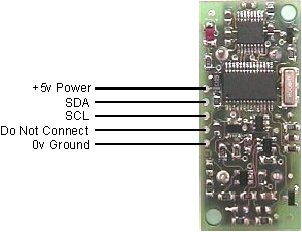
SRF08 Sensor layout
Circuit
Below is the diagram for setting up the SRF08 sensor for a typical Arduino. The only additional circuitry necessary are two 1.8kOhm pullup resistors as seen below.
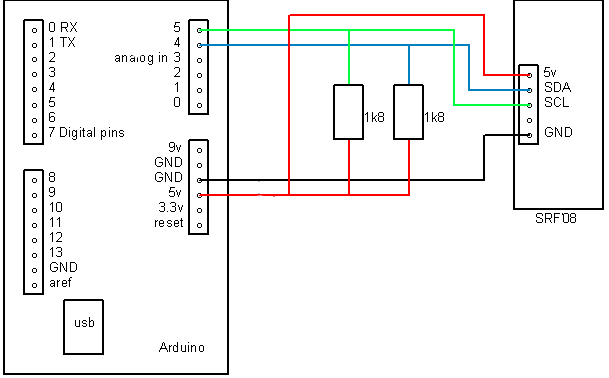
Circuit diagram
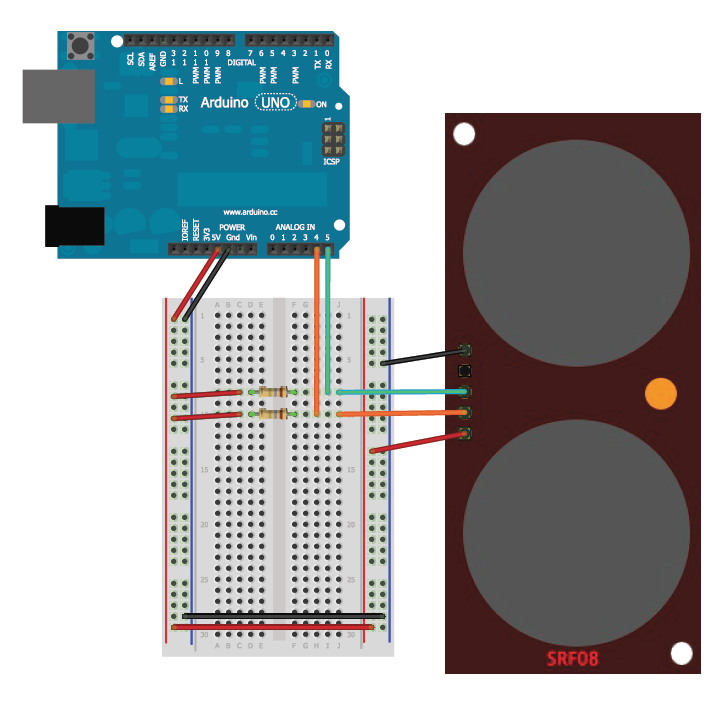
BreadBoard
Code
- The library for this sensor can be downloaded here - Sonar SRF08.zip
- View the library on Github
- /*
- * SRF08.ino - example interfacing with sonar sensor SRF08
- * library uses Wire.h
- * SDA - Analog Pin 4
- * SCL - Analog Pin 5
- *
- * Authors:
- * - Zach Foresta - Foureza87@yahoo.com (April 2009)
- * - Leo Colomb - @LeoColomb (May 2012)
- *
- * For component setup - http://www.arduino.cc/playground/Main/SonarSrf08
- */
- #include <Wire.h>
- #include <SonarSRF08.h>
- SonarSRF08 MySonar;
- #define CommandRegister 0x00
- int New_Address = 248; // 0xF8
- #define ResultRegister 0x02
- #define GainRegister 0x00 // Setup Analogue Gain -- http://www.robot-electronics.co.uk/htm/srf08tech.html section "Analogue Gain"
- #define RangeLocation 0xFF // Setup Range Location -- http://www.robot-electronics.co.uk/htm/srf08tech.html section "Changing the Range"
- int DEBUG = 1;
- char unit = 'c'; // 'i' for inches, 'c' for centimeters, 'm' for micro-seconds
- float sensorReading = 0;
- int time = 70;
- void setup()
- {
- MySonar.connect();
- MySonar.changeAddress(CommandRegister, New_Address, GainRegister, RangeLocation);
- if (DEBUG){
- Serial.begin(9600);
- }
- New_Address += 4;
- // offset address not sure why this is but it works for this address
- }
- void loop()
- {
- // set units, gain, and range location for reading out distance
- MySonar.setUnit(CommandRegister, New_Address, unit, GainRegister, RangeLocation);
- // pause
- delay(time);
- // set register for reading
- MySonar.setRegister(New_Address, ResultRegister);
- // read data from result register
- sensorReading = MySonar.readData(New_Address, 2);
- // print out distance
- Serial.print("Distance: ");
- Serial.print(sensorReading);
- Serial.print(" units");
- Serial.println();
- // pause
- delay(time);
- }