Learning Examples | Foundations | Hacking | Links
Examples > WiFi Library
WiFi Web Client Repeating
This example shows you how to make repeated HTTP requests using a WiFi shield. It connects to http://www.arduino.cc/latest.txt. The content of the page is viewable through your Arduino's serial window.
This example is written for a network using WPA encryption. For WEP or WPA, change the Wifi.begin() call accordingly.
Hardware Required
- Arduino WiFi Shield
- Shield-compatible Arduino board
Circuit
The WiFi shield uses pins 10, 11, 12, and 13 for the SPI connection to the HDG104 module. Digital pin 4 is used to control the slave select pin on the SD card.
You should have access to a 802.11b/g wireless network that connects to the internet for this example. You will need to change the network settings in the sketch to correspond to your particular networks SSID.
For networks using WPA/WPA2 Personal encryption, you need the SSID and password. The shield will not connect to networks using WPA2 Enterprise encryption.
WEP network passwords are hexadecimal strings known as keys. A WEP network can have 4 different keys; each key is assigned a "Key Index" value. For WEP encrypted networks, you need the SSID, the key, and key number.
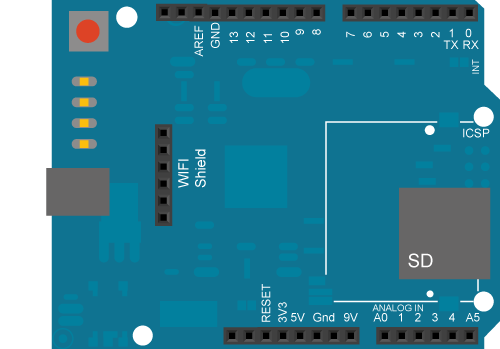
image developed using Fritzing. For more circuit examples, see the Fritzing project page
In the above image, the Arduino would be stacked below the WiFi shield.
Code:
Repeating Wifi Web client
This sketch connects to a a web server and makes a request
using an Arduino Wifi shield.
Circuit:
* Wifi shield attached to pins 10, 11, 12, 13
created 23 Apr 2012
by Tom Igoe
http://arduino.cc/en/Tutorial/WifiWebClientRepeating
This code is in the public domain.
*/
#include <SPI.h>
#include <WiFi.h>
char ssid[] = "yourNetwork"; // your network SSID (name)
char pass[] = "secretPassword"; // your network password
int keyIndex = 0; // your network key Index number (needed only for WEP)
int status = WL_IDLE_STATUS;
// Initialize the Wifi client library
WiFiClient client;
// server address:
char server[] = "www.arduino.cc";
//IPAddress server(64,131,82,241);
unsigned long lastConnectionTime = 0; // last time you connected to the server, in milliseconds
boolean lastConnected = false; // state of the connection last time through the main loop
const unsigned long postingInterval = 10*1000; // delay between updates, in milliseconds
void setup() {
// start serial port:
Serial.begin(9600);
// attempt to connect to Wifi network:
while ( status != WL_CONNECTED) {
Serial.print("Attempting to connect to SSID: ");
Serial.println(ssid);
status = WiFi.begin(ssid, pass);
// wait 10 seconds for connection:
delay(10000);
}
// you're connected now, so print out the status:
printWifiStatus();
}
void loop() {
// if there's incoming data from the net connection.
// send it out the serial port. This is for debugging
// purposes only:
while (client.available()) {
char c = client.read();
Serial.write(c);
}
// if there's no net connection, but there was one last time
// through the loop, then stop the client:
if (!client.connected() && lastConnected) {
Serial.println();
Serial.println("disconnecting.");
client.stop();
}
// if you're not connected, and ten seconds have passed since
// your last connection, then connect again and send data:
if(!client.connected() && (millis() - lastConnectionTime > postingInterval)) {
httpRequest();
}
// store the state of the connection for next time through
// the loop:
lastConnected = client.connected();
}
// this method makes a HTTP connection to the server:
void httpRequest() {
// if there's a successful connection:
if (client.connect(server, 80)) {
Serial.println("connecting...");
// send the HTTP PUT request:
client.println("GET /latest.txt HTTP/1.1");
client.println("Host: www.arduino.cc");
client.println("User-Agent: arduino-ethernet");
client.println("Connection: close");
client.println();
// note the time that the connection was made:
lastConnectionTime = millis();
}
else {
// if you couldn't make a connection:
Serial.println("connection failed");
Serial.println("disconnecting.");
client.stop();
}
}
void printWifiStatus() {
// print the SSID of the network you're attached to:
Serial.print("SSID: ");
Serial.println(WiFi.SSID());
// print your WiFi shield's IP address:
IPAddress ip = WiFi.localIP();
Serial.print("IP Address: ");
Serial.println(ip);
// print the received signal strength:
long rssi = WiFi.RSSI();
Serial.print("signal strength (RSSI):");
Serial.print(rssi);
Serial.println(" dBm");
}
See Also:
- ConnectNoEncryption : Demonstrates how to connect to an open network
- ConnectWithWEP : Demonstrates how to connect to a network that is encrypted with WEP
- ConnectWithWPA : Demonstrates how to connect to a network that is encrypted with WPA2 Personal
- ScanNetworks : Displays all WiFi networks in range
- WiFiChatServer : Set up a simple chat server
- WiFiPachubeClient : connect to pachube.com, a free datalogging site
- WiFiPachubeClientString: send strings to pachube.com
- WiFiTwitterClient : A Twitter client with Strings
- WiFiWebClient : Connect to a remote webserver
- WiFiWebClientRepeating: Repeatedly make HTTP calls to a server
- WiFiWebServer : Serve a webpage from the WiFi shield
